Apple iOS 27 Beta 2 Update: Everything New in the Latest Beta

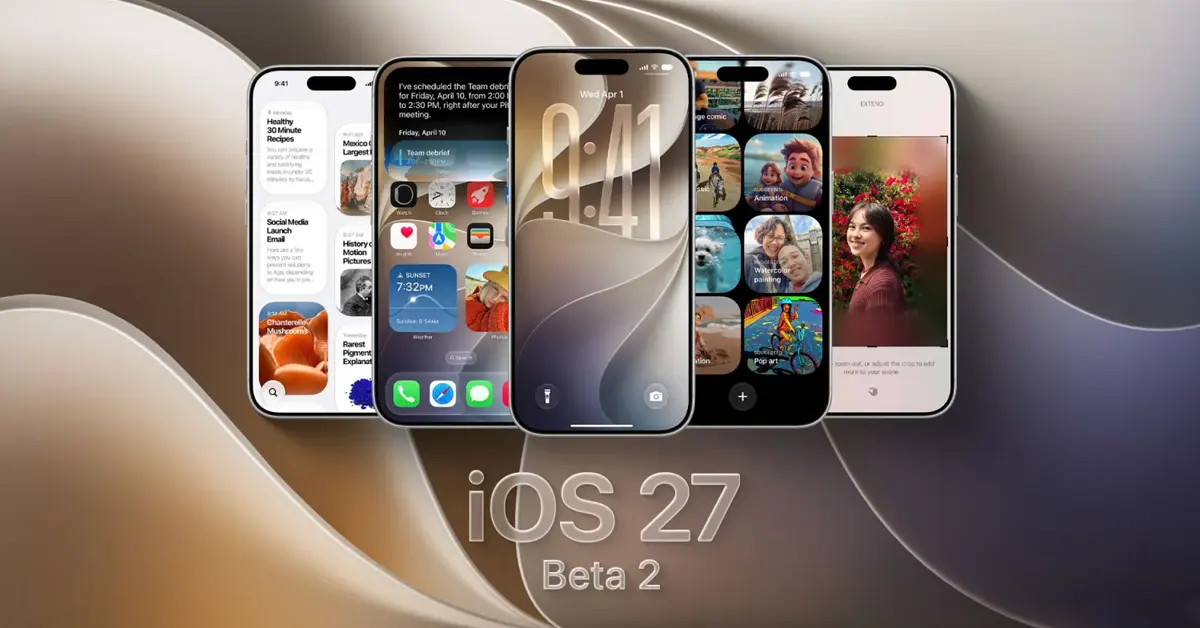
Apple has officially rolled out the second developer beta of iOS 27 to registered testers. Coming just two weeks after the operating system’s massive unveiling at WWDC 2026, Apple iOS 27 Beta 2 brings a highly anticipated wave of refinements, foundational system optimization, and the activation of several high-profile features that were missing in the initial developer seed.
As Apple refines its ecosystem for the upcoming iPhone 18 lineup, this second beta focuses heavily on accelerating on-device Apple Intelligence, expanding Apple Wallet versatility, resolving early performance regressions, and tweaking user interface elements. Whether you are an adventurous enthusiast or a developer building for the next generation of Apple software, keeping track of these fast-moving changes is essential.
What’s New in Apple iOS 27 Beta 2?
If you are looking for a quick breakdown of what this release introduces, here is a consolidated snapshot of the most significant changes, optimizations, and bug fixes arriving in this build:
- Siri AI Overhaul & “Write with Siri”: Significant reduction in Siri response latency due to optimized LLM execution on the Neural Engine. Contextual awareness is sharper, and new “Write with Siri” generative text shortcut buttons have been integrated directly into Notes, Mail, and Messages.
- Physical Pass Scanning in Apple Wallet: Users can now convert physical loyalty cards, gym memberships, and event tickets into digital Apple Wallet passes simply by aiming the camera at a barcode using the new Siri Camera mode.
- Advanced Lock Screen Controls: The system-wide “Liquid Glass” interface styling receives a granular opacity slider under Settings, allowing users to customize transparency across UI elements.
- RCS Interoperability Upgrades: Apple has added the ability to reply to specific Rich Communication Services (RCS) messages from Android users, accompanied by properly rendered Tapback emoji reactions on shared multimedia.
- CarPlay Mini Player: A persistent audio mini player overlay now stays visible during active navigation, eliminating the need to leave the maps interface to skip tracks or pause music.
- Thermal and Battery Management: Early fixes for severe background daemon battery drain observed in Beta 1, resulting in lower operating temperatures during prolonged usage.
Apple iOS 27 Beta 2 at a Glance
| Category | Details |
|---|---|
| Version | iOS 27.0 Developer Beta 2 (Build 24A5279e) |
| Release Date | June 22, 2026 |
| Beta Type | Developer Beta (Public Beta tracking for July) |
| Supported Devices | iPhone 15 series, iPhone 16 series, iPhone 17 series, and upcoming 2026 models |
| Major New Features | Write with Siri, Wallet physical pass import, Liquid Glass slider, CarPlay Audio Mini Player |
| Bug Fixes | Home Screen wallpaper stutter, background asset download loop, cellular dropouts |
| Security Updates | Contextual sandboxing patches for Apple Intelligence pipelines |
| Stability Improvements | Refined RAM management for 8GB device baselines |
Apple iOS 27 Beta 2 New Features
Faster Siri AI & Contextual Response Pipelines
Apple’s core focus for iOS 27 is a complete rebuilding of Siri around native, on-device large language models. In Beta 2, Apple has dramatically cut down command processing latency. Siri no longer utilizes a full screen-edge glow; instead, it is subtly housed within an updated Dynamic Island animation framework.
The update introduces “Write with Siri” contextual text insertion buttons inside system applications. When drafting an email or writing a note, Siri can analyze the surrounding context to help brainstorm, proofread, or reformat text instantly without requiring explicit copy-pasting into a separate AI tool.
Apple Wallet Physical Pass Import
To fulfill a long-standing request from users looking to entirely ditch physical wallets, iOS 27 Beta 2 adds native document ingestion mechanics.
By utilizing the camera app in a dedicated Siri mode, users point their device at any card featuring a traditional barcode or QR code. The system reads the geometric data, extracts relevant identifiers, and automatically packages it into a native Apple Wallet card layout.
CarPlay Overlays and Wireless Stability
CarPlay receives a major quality-of-life update targeting driver distraction. Instead of forcing users to switch full-screen interfaces between navigation apps and audio players, Beta 2 activates a floating Audio Mini Player. This miniature widget sits unobtrusively on top of Apple Maps, Google Maps, or TomTom, giving drivers instant access to play, pause, and track skip actions across all major audio apps like Spotify and Apple Music.
User Interface and Design Changes
Lock Screen Enhancements & Wallpaper Extensions
The lock screen continues to evolve with deeper automation. Beta 2 officially introduces AI Wallpaper Extension, powered by Apple Intelligence. If a user chooses a photo that does not natively fit the 19.5:9 aspect ratio of modern iPhones, the system can automatically synthesize and generate matching visual imagery along the borders to extend the photo cleanly across the entire canvas.
Additionally, a new Compact Clock Mode shifts the clock size downward and groups it alongside horizontal system widgets, clearing up vertical real estate to show off your custom lock screen photos.
Liquid Glass Customization
The system-wide visual motif for iOS 27 is “Liquid Glass”—a distinct blur, depth, and glassmorphism styling across notifications, menus, and application panels. Responding to readability concerns in Beta 1, Apple has introduced a granular slider to customize this effect.
- Location:
Settings > General > Appearance > Liquid Glass Opacity - Behavior: Users can dial the background transparency from full vibrant glass down to a high-contrast opaque layout to dramatically improve visibility under bright sunlight.
Performance Improvements
System engineering tweaks in Beta 2 target performance bottlenecks introduced by early Apple Intelligence deployment pipelines.
- RAM Management: Background processes have been aggressively optimized. Applications that previously refreshed frequently due to high AI memory reservations now remain frozen in the background cache significantly longer.
- App Launch Speed: Native applications like Messages and Photos launch roughly 15% faster compared to Beta 1, eliminating a brief stutter when loading large chronological indexing databases.
- Thermal Management: Internal device testing indicates a reduction in peak temperature during heavy multi-tasking. Beta 1 frequently caused localized heating near the logic board during automated background photo indexing; Beta 2 introduces smarter throttling schedules for these non-urgent tasks.
Battery Life Improvements
Developer Beta 1 was plagued by standard early-cycle battery regressions, primarily driven by unoptimized background telemetry and local machine learning model updates. Beta 2 addresses several core background loops, resulting in a more predictable power draw curve.
Battery Optimization Comparison
| Scenario | Beta 1 Behavior | Beta 2 Behavior |
|---|---|---|
| Standby Drain | High (Up to 3% loss per hour idle) | Normalized (~0.5% to 1% loss per hour idle) |
| Video Playback | Rapid thermal build-up; high drain | Stable; local video rendering paths optimized |
| Gaming | Thermal throttling after 15 minutes | Sustained framerates; smoother voltage stepping |
| Daily Usage | Heavy users required a midday top-up | Easily reaches late afternoon under mixed workloads |
Bug Fixes in iOS 27 Beta 2
Dozens of developer-reported regressions have been resolved in this revision. The most prominent stability fixes include:
- Connectivity Fixes: Resolved an issue where Wi-Fi connections would periodically drop and refuse to auto-reconnect without toggling Airplane Mode.
- Camera Fixes: Fixed a bug causing the viewfinder to display a black screen for several seconds when switching between wide and ultra-wide lenses.
- Notification Fixes: Corrected a layout bug where notification banners would stack directly on top of each other, making older notifications unreadable.
- App Compatibility Fixes: Addressed an API conflict that caused banking and enterprise authentication applications to crash instantly upon launch.
- Bluetooth Fixes: Fixed audio clipping and dropouts when streaming high-bitrate spatial audio to AirPods Pro 3 and compatible audio gear.
Known Issues and Remaining Bugs
As a second developer build, iOS 27 Beta 2 remains experimental software. It contains hidden bugs that can disrupt daily productivity.
- Image Playground Crash: Generating complex scenes via text prompts in Image Playground can cause the app to crash if the device storage headroom drops below 15%.
- Widget Blanking: Home Screen widgets may occasionally lose their graphical state and render as blank grey boxes. Workaround: Restarting the device or removing and re-adding the widget resolves the issue temporarily.
- RCS Media Failures: While text replies are working smoothly, sending high-resolution video over RCS channels to legacy Android profiles can occasionally fail to deliver.
Supported iPhones
Apple has maintained its modern hardware baseline for iOS 27, requiring robust neural engines to run the system’s core local AI architecture.
| iPhone Model Series | Supported in iOS 27? |
|---|---|
| iPhone 17 Series (Pro, Max, Slim, Base) | Yes (Native Platform) |
| iPhone 16 Series (Pro, Max, Plus, Base) | Yes (Full AI Compatibility) |
| iPhone 15 Pro / Pro Max | Yes (Full AI Compatibility) |
| iPhone 15 / 15 Plus | Yes (Standard features; limited local AI) |
| iPhone 14 Series and Older | No (Legacy software lifecycle) |
How to Download Apple iOS 27 Beta 2
If you are a registered developer or have opted into beta channels via your Apple Account, you can deploy Beta 2 using these steps:
-
RequiredCreate a Comprehensive Backup
Navigate to
Settings > [Your Name] > iCloud > iCloud Backupand select Back Up Now. Alternatively, connect your iPhone to a Mac or PC to perform an encrypted local backup. This ensures you can downgrade safely if data issues occur. -
Beta VerificationConfigure Your Apple ID Settings
Ensure the Apple ID signed into your iPhone is associated with either a free or paid Apple Developer account or enrolled in the Apple Beta Software Program.
-
Settings ConfigurationEnable the Beta Toggle
Go to
Settings > General > Software Update. Tap on Beta Updates and select the iOS 27 Developer Beta option from the list. -
Over-the-Air UpdateDownload and Install Build
Return to the main Software Update screen. iOS 27 Beta 2 will appear. Tap Download and Install, enter your passcode, and keep your device connected to a power source until the installation wraps up.
Apple iOS 27 Beta 1 vs Beta 2
| Feature / Metric | Developer Beta 1 | Developer Beta 2 |
|---|---|---|
| System Stability | Experimental; frequent SpringBoard crashes | Noticeably more stable for core apps |
| Siri AI Latency | 2.5–3.0 second response processing delay | Under 1.2 seconds for local commands |
| Battery Life Baseline | 4 to 5 hours Screen-On Time max | 5.5 to 6.5 hours Screen-On Time |
| Core UI Features | Rough Liquid Glass layout; no opacity control | Liquid Glass opacity slider fully active |
| Android Interop | Basic RCS text message routing | Advanced RCS specific-message replies active |
Should You Install Apple iOS 27 Beta 2?
Developers
Recommendation: Yes.
If your business relies on updating apps for the fall release window, Beta 2 fixes critical API crashes and stablizes memory restrictions, making it an excellent development environment to test app performance.
Tech Enthusiasts
Recommendation: Conditional.
If you have a secondary iPhone or don’t mind occasional system visual glitches, Beta 2 is stable enough to explore new additions like the Wallet card import tools and upgraded Siri response speeds.
Everyday Users
Recommendation: No.
Avoid this release. Despite clear improvements over Beta 1, unexpected bugs can cause banking apps to drop or impact your battery life unexpectedly. Wait for the more thoroughly vetted Public Beta arriving next month.
Expected iOS 27 Beta Roadmap
Apple’s development cycles adhere to highly predictable summer testing schedules leading up to major hardware events in September.
-
Developer Beta 1June 8, 2026Initial release deployed immediately following the WWDC 2026 Opening Keynote.
-
Developer Beta 2June 22, 2026Current release bringing critical bug fixes, Siri speed tuning, and UI sliders.
-
Developer Beta 3 & Public Beta 1Mid-July 2026Expected release introducing broader stability passes and opening the update to public testers.
-
Weekly Beta IterationsAugust 2026Transitioning from bi-weekly updates to a rapid weekly schedule focused exclusively on optimization.
-
Release Candidate (RC)Early September 2026The final feature-complete build distributed to testers ahead of the public rollout.
-
Public Stable LaunchMid-September 2026Official worldwide release accompanying the retail rollout of the iPhone 18 lineup.
Frequently Asked Questions
Is iOS 27 Beta 2 stable enough for daily use?
While it is vastly superior to Beta 1, it is still not recommended for a primary daily device due to potential app compatibility problems and edge-case battery drain.
Does iOS 27 Beta 2 improve battery life?
Yes, it fixes serious background indexing loops that caused overheating in Beta 1. However, battery consumption is still higher than stable iOS 26 builds.
Which iPhones support iOS 27 Beta 2?
It is supported on the iPhone 15 series, iPhone 16 series, and iPhone 17 families. Support has been dropped for older, non-AI-capable hardware architectures.
Can I downgrade from Beta 2 back to iOS 26?
Yes. You can downgrade by connecting your iPhone to a computer, placing it into Recovery Mode, and restoring the latest signed public iOS 26 IPSW file. This process will wipe unsubstantiated local data.
Is the Public Beta out yet?
No, this is currently a Developer Beta. The official Public Beta is scheduled to arrive in July 2026.
How do I fix blank widgets in Beta 2?
Remove the widget from your home screen, restart your iPhone, and then re-add the widget via the customization menu.
Does Apple CarPlay work reliably in Beta 2?
Yes. Beta 2 brings notable wireless connectivity architecture updates that address the random dropouts common in Beta 1.
Can I generate AI wallpapers in Beta 2?
Yes, the feature is accessible via the updated Image Playground menu settings, allowing direct export to the lock screen wallpaper canvas.
What is the “Liquid Glass” slider?
It is a new accessibility and design setting under Settings > General > Appearance that lets you change the transparency of blurred interface elements across the OS.
Does banking apps work on iOS 27 Beta 2?
Many major banking apps have been updated to run on Beta 2, but certain strict corporate or enterprise authentication apps may still fail until the final stable release.
Conclusion
Apple’s iOS 27 Beta 2 marks an important step toward a fully realized, AI-integrated mobile experience. By addressing early battery drain, sharpening Siri’s reflexes, and expanding everyday tools like Apple Wallet and CarPlay, Apple is quickly preparing its core operating software for prime time. Unless you are a developer or an advanced user eager to test the new “Write with Siri” integrations, your best bet is to remain on a stable build and watch for the refined Public Beta arriving next month.